

How Bitcoin Wallets Work:
Imagine carrying ₹10 lakh in cash every day.
Most people wouldn’t.
Instead, they keep their money in a bank account and use a debit card or mobile banking app whenever they need to make a payment.
Many beginners assume Bitcoin works the same way—that a Bitcoin wallet stores their bitcoins just like a physical wallet stores cash.
Surprisingly, that’s not how Bitcoin works.
A Bitcoin wallet does not actually store Bitcoin.
Instead, it stores the digital credentials that prove you own Bitcoin recorded on the blockchain.
Understanding this single concept can eliminate one of the biggest misconceptions beginners have about cryptocurrency.
Whether you’re planning to buy your first Bitcoin or simply want to understand how digital wallets function, this guide explains everything step by step in simple language.
Quick Summary
If you’re new to Bitcoin wallets, remember these key points:
- A Bitcoin wallet does not store Bitcoin.
- Bitcoin always remains recorded on the blockchain.
- A wallet stores cryptographic keys that allow you to access and spend your Bitcoin.
- Public keys can be shared.
- Private keys must always remain secret.
- Losing your private key or recovery phrase may result in permanent loss of access to your funds.
💡 Key Takeaway
A Bitcoin wallet is better understood as a digital key manager rather than a storage container for coins.
What Is a Bitcoin Wallet? & How Bitcoin Wallets Work?
A Bitcoin wallet is a software application or hardware device that allows users to interact with the Bitcoin blockchain.
Its primary functions include:
- Creating Bitcoin addresses
- Managing public and private keys
- Signing transactions
- Sending Bitcoin
- Receiving Bitcoin
- Checking wallet balances by reading blockchain data
The wallet itself never contains the Bitcoin.
Instead, it gives you permission to access Bitcoin that already exists on the blockchain.
The Biggest Myth About Bitcoin Wallets
One of the most common misunderstandings is:
“My Bitcoin is stored inside my wallet.”
This is incorrect.
Bitcoin is never stored inside your phone, laptop, or hardware wallet.
Every Bitcoin transaction is permanently recorded on the blockchain.
Your wallet simply holds the cryptographic keys that allow you to prove ownership and authorize transactions.
Think of the blockchain as a giant public ledger that records who controls which bitcoins.
Your wallet is the tool that lets you interact with that ledger.
Real-Life Analogy
Imagine renting a safety deposit box at a bank.
The valuables are inside the secure vault—not inside the key you carry.
Your key simply gives you access.
A Bitcoin wallet works in a similar way.
The blockchain records ownership, while your wallet provides the keys needed to access and spend your Bitcoin.
📌 Did You Know?
If you install the same wallet on a new device using your recovery phrase, your Bitcoin doesn’t move anywhere.
The wallet simply reconnects to the blockchain and restores access to your funds.
How Bitcoin Wallets Work?
A Bitcoin wallet performs several tasks behind the scenes whenever you send or receive Bitcoin.
Let’s break the process into simple steps.
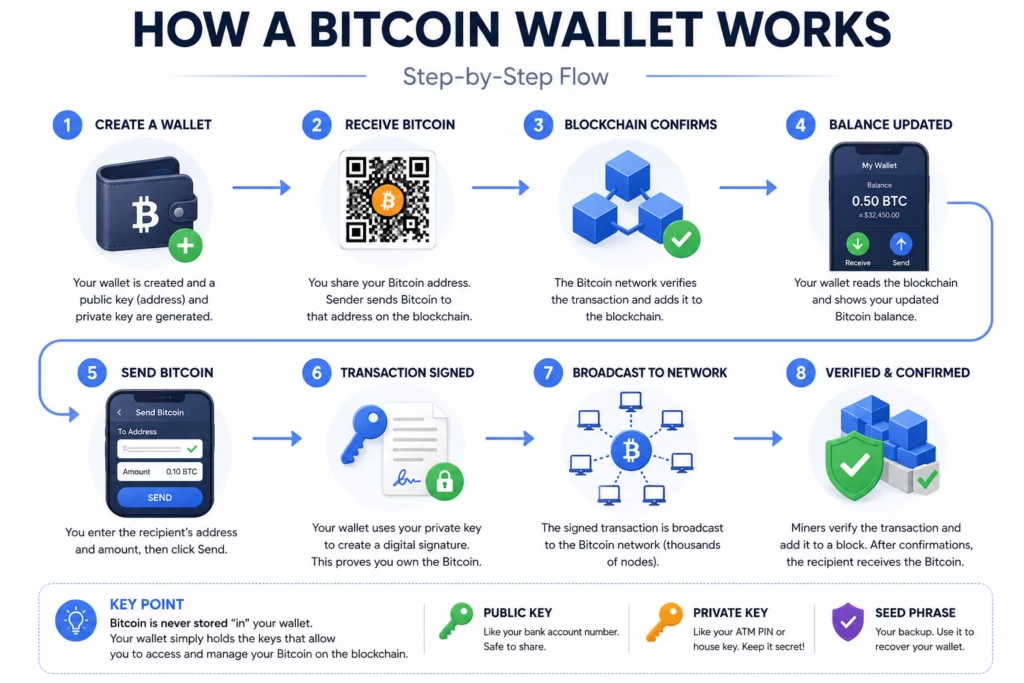
Step 1 — Create a Wallet
When you create a Bitcoin wallet for the first time, it automatically generates:
- A private key
- A public key
- One or more Bitcoin addresses
- A recovery (seed) phrase
These are created using cryptographic algorithms.
Step 2 — Receive Bitcoin
Suppose your friend wants to send you Bitcoin.
You share your Bitcoin address.
Your friend creates a transaction and broadcasts it to the Bitcoin network.
After the transaction is confirmed, the blockchain records that the Bitcoin is now associated with your address.
Your wallet detects this update and displays the new balance.
Step 3 — Send Bitcoin
When you send Bitcoin:
- You enter the recipient’s Bitcoin address.
- Choose the amount.
- Confirm the transaction.
Your wallet then uses your private key to create a digital signature.
This signature proves that you are authorized to spend the Bitcoin associated with your address.
The private key never needs to be shared with the recipient or the network.
Step 4 — Network Verification
The signed transaction is broadcast to Bitcoin nodes.
The network verifies:
- The signature is valid.
- The Bitcoin has not already been spent.
- The transaction follows Bitcoin’s protocol rules.
If everything is correct, miners include the transaction in a block, and it becomes part of the blockchain.
Transaction Flow
Your Wallet
      │
      ▼
Create Transaction
      │
      ▼
Sign with Private Key
      │
      ▼
Broadcast to Bitcoin Network
      │
      ▼
Node Verification
      │
      ▼
Block Confirmation
      │
      ▼
Receiver Gets Bitcoin
💡 Key Takeaway
Your wallet never sends Bitcoin directly.
It creates a signed instruction that tells the Bitcoin network to update ownership on the blockchain.
Public Key, Private Key, and Wallet Address
These three terms are often confused.
Let’s understand them using a simple analogy.
Public Key
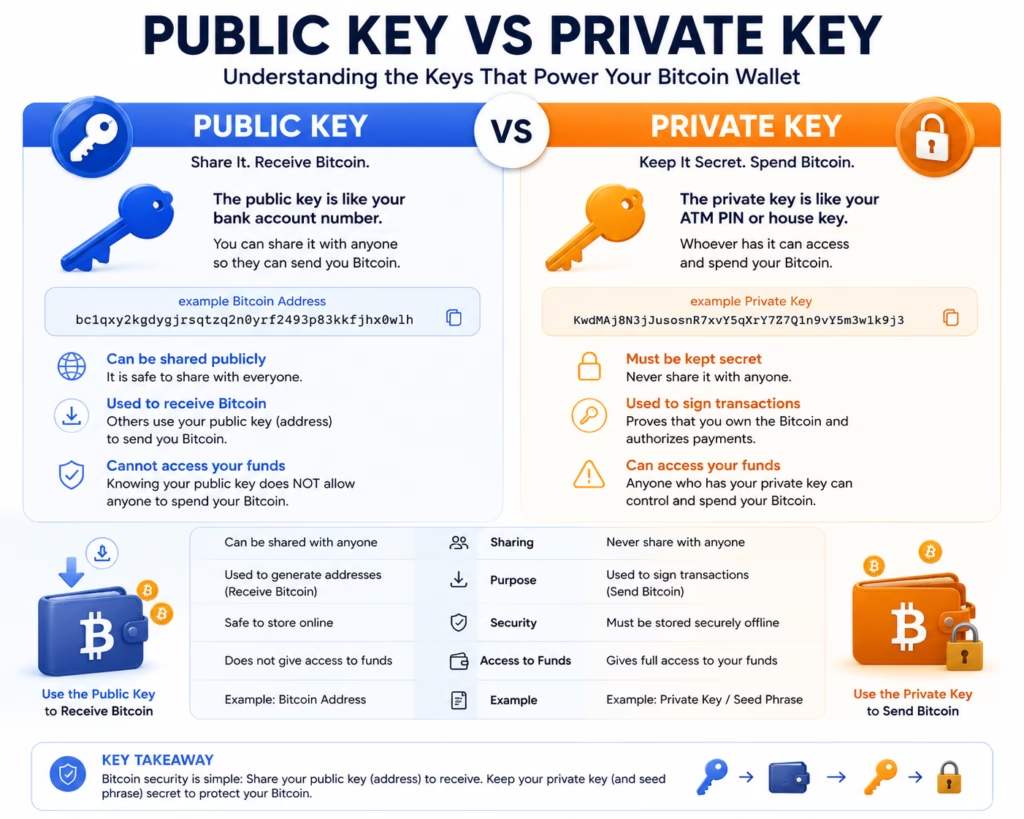
A public key is similar to your bank account number.
You can safely share it with others so they can send you Bitcoin.
Knowing someone’s public key does not allow you to spend their Bitcoin.
Private Key
A private key is like the master key to your house.
Anyone who possesses it can control your Bitcoin.
For this reason, private keys should never be shared or stored carelessly.
Wallet Address
A wallet address is a shorter, user-friendly version derived from the public key.
Instead of sharing a long cryptographic key, users typically share wallet addresses when receiving Bitcoin.
Example:
bc1qxy2kgdygjrsqtzq2n0yrf2493p83kkfjhx0wlhWallet addresses are designed to make receiving Bitcoin easier.
⚠ Common Mistake
Many beginners think their wallet address and private key are the same.
They are completely different.
- Wallet Address → Safe to share.
- Private Key → Must remain secret.
What Is a Digital Signature?
One of the most important jobs performed by a Bitcoin wallet happens behind the scenes.
Whenever you send Bitcoin, your wallet creates a digital signature.
This signature is not a handwritten signature or a scanned image. Instead, it is a mathematical proof generated using your private key.
Its purpose is simple:
To prove that the transaction was authorized by the owner of the Bitcoin without revealing the private key itself.
This process allows the Bitcoin network to verify ownership while keeping your private key confidential.
Real-Life Analogy
Imagine signing an important legal document.
People can verify that the signature belongs to you, but they cannot recreate your signature perfectly.
A Bitcoin digital signature works in a similar way.
It proves authorization without exposing the secret key used to create it.
Why Doesn’t the Wallet Send the Private Key?
This is another common misconception.
When you send Bitcoin:
❌ Your private key is never transmitted to the Bitcoin network.
Instead:
- The wallet creates a digital signature using the private key.
- The signature is attached to the transaction.
- Nodes verify the signature using the corresponding public key.
- If the signature is valid, the transaction can proceed.
This design is one of the reasons Bitcoin remains secure.
📌 Did You Know?
Even the Bitcoin network never needs to know your private key.
It only verifies whether the digital signature was created by the correct key.
What Is a Seed Phrase?
When you create a Bitcoin wallet, it usually generates a list of 12 or 24 random words.
This is called a seed phrase, recovery phrase, or backup phrase.
Example:
apple
river
orange
planet
silver
...
(Real wallets generate random words. Never use example words as your actual backup.)
This phrase acts as the master backup for your wallet.
If your phone, computer, or hardware wallet is lost or damaged, you can restore access to your Bitcoin using the same seed phrase.
Why Is the Seed Phrase So Important?
Think of the seed phrase as the master key to a secure vault.
If you lose your device but still have the seed phrase, you can recover your wallet.
If someone else obtains your seed phrase, they can also recover your wallet and control your Bitcoin.
For this reason:
- Never share it online.
- Never store it in screenshots or cloud notes.
- Keep an offline backup in a secure location.
⚠ Common Mistake
Many beginners focus only on protecting their wallet app.
The seed phrase is even more important because it can recreate the entire wallet.
Types of Bitcoin Wallets
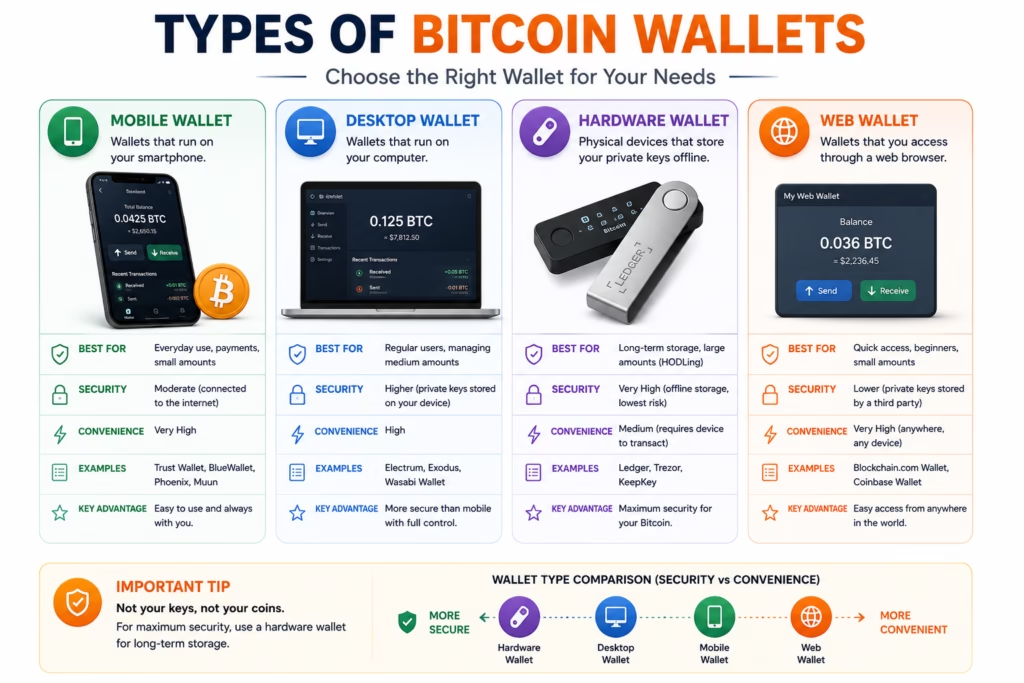
Not all Bitcoin wallets are the same.
Different wallet types are designed for different purposes.
Understanding the differences helps users choose the right option for their needs.
Mobile Wallets
Mobile wallets run on smartphones.
Examples include wallets available for Android and iPhone.
Advantages
- Easy to use
- Convenient for everyday payments
- Quick access
Limitations
- Depends on phone security
- Higher exposure to online threats than offline storage
Desktop Wallets
Desktop wallets are installed on a computer.
Advantages
- More features than many mobile wallets
- Suitable for regular users
Limitations
- Security depends on the computer’s protection against malware
Web Wallets
Web wallets operate through a browser.
Some cryptocurrency exchanges also provide web-based wallets.
Advantages
- Accessible from multiple devices
- Easy for beginners
Limitations
- Users should carefully evaluate the security practices of the service provider.
Hardware Wallets
Hardware wallets are physical devices designed specifically for protecting cryptocurrency keys.
Instead of keeping private keys on an internet-connected computer, they store them inside dedicated secure hardware.
Advantages
- Strong protection against online attacks
- Suitable for long-term storage
- Private keys remain isolated from internet-connected devices
Limitations
- Additional cost
- Slightly less convenient for frequent transactions
Paper Wallets
A paper wallet is a printed copy of wallet information such as private keys or recovery information.
Although paper wallets were more common in Bitcoin’s early years, they are generally not recommended for beginners because they can be easily damaged, lost, or created insecurely if not generated correctly.
Hot Wallet vs Cold Wallet
Another important distinction is whether a wallet is connected to the internet.
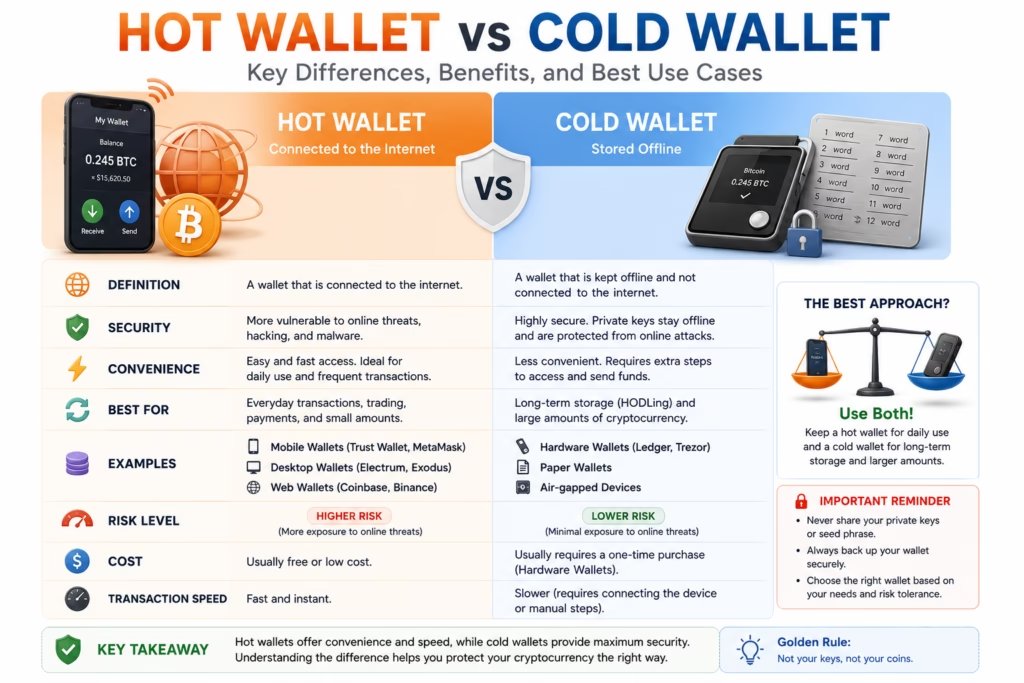
Hot Wallet
A hot wallet remains connected to the internet most of the time.
Examples:
- Mobile wallet
- Desktop wallet
- Web wallet
Best For
- Everyday transactions
- Small balances
- Frequent payments
Cold Wallet
A cold wallet remains offline when not in use.
Examples:
- Hardware wallet
- Secure offline storage
Best For
- Long-term holdings
- Larger balances
- Enhanced security
Comparison Table
| Hot Wallet | Cold Wallet |
|---|---|
| Connected to the internet | Stored offline |
| Faster access | Better long-term security |
| Convenient for daily use | Better for long-term storage |
| Higher exposure to online threats | Reduced online attack surface |
💡 Key Takeaway
Neither wallet type is universally better.
Many experienced users combine both:
- A hot wallet for everyday transactions.
- A cold wallet for long-term storage.
How to Choose the Right Wallet
Choosing a wallet depends on how you plan to use Bitcoin.
| Situation | Suggested Wallet Type |
|---|---|
| Learning Bitcoin | Mobile Wallet |
| Everyday Payments | Mobile or Desktop Wallet |
| Long-Term Holding | Hardware Wallet |
| Frequent Trading | Exchange Wallet (with caution) |
| Large Holdings | Hardware Wallet with secure backups |
Remember that convenience and security often involve trade-offs.
Beginner Security Checklist
Before using any Bitcoin wallet, follow these practices:
- Download wallets only from official sources.
- Back up your seed phrase offline.
- Never share your private key.
- Enable two-factor authentication where available.
- Verify wallet addresses before sending Bitcoin.
- Keep wallet software updated.
- Be cautious of phishing websites and fake wallet apps.
📌 Did You Know?
Most cryptocurrency losses reported by individuals result from phishing, scams, stolen credentials, or poor security practices—not because the Bitcoin blockchain itself was hacked.
How Does a Bitcoin Transaction Work?
Once you understand what a Bitcoin wallet is, the next step is understanding what happens when you press the Send button.
Although the process takes only a few seconds to initiate, several important steps happen behind the scenes.
Step 1 — Create the Transaction
You enter:
- The recipient’s Bitcoin address
- The amount of Bitcoin to send
- (Optional) A transaction fee
Your wallet prepares the transaction.
At this point, nothing has been sent yet.
Step 2 — Sign the Transaction
Your wallet uses your private key to generate a digital signature.
This signature proves that you own the Bitcoin you want to spend.
Importantly, your private key never leaves the wallet.
Only the signature is shared with the network.
Step 3 — Broadcast to the Bitcoin Network
The signed transaction is broadcast to thousands of Bitcoin nodes around the world.
Each node independently verifies:
- Is the signature valid?
- Does the sender own the Bitcoin?
- Has this Bitcoin already been spent?
- Does the transaction follow Bitcoin’s rules?
If all checks pass, the transaction is accepted into the network.
Step 4 — Confirmation
Miners (or validators, depending on the blockchain) include the transaction in a new block.
Once the block is added to the blockchain, the transaction receives its first confirmation.
As more blocks are added, the transaction becomes increasingly secure and difficult to reverse.
Bitcoin Transaction Flow
Sender Wallet
      │
      ▼
Transaction Created
      │
      ▼
Digital Signature
      │
      ▼
Bitcoin Network
      │
      ▼
Node Verification
      │
      ▼
Block Confirmation
      │
      ▼
Receiver Wallet Updated
💡 Key Takeaway
A Bitcoin wallet doesn’t transfer coins like sending a file.
Instead, it creates a signed instruction that tells the blockchain to update ownership.
Why Do Bitcoin Transactions Have Fees?
Every Bitcoin transaction includes a network fee.
This fee is not charged by your wallet.
Instead, it is paid to miners who help process and secure the Bitcoin network.
The fee depends on:
- Network congestion
- Transaction size (in data, not Bitcoin amount)
- Desired confirmation speed
During busy periods, users may choose to pay a higher fee to encourage faster processing.
Why Does My Wallet Balance Change?
Your wallet calculates your balance by reading information stored on the blockchain.
Whenever the blockchain records a new confirmed transaction involving one of your addresses, your wallet automatically updates the displayed balance.
The Bitcoin itself never enters or leaves the wallet.
The blockchain simply updates the ownership record.
Can I Recover My Wallet?
Yes—if you have your recovery (seed) phrase.
When you restore a wallet:
- Install a compatible wallet application.
- Choose the option to restore an existing wallet.
- Enter your recovery phrase exactly as provided.
- The wallet regenerates your keys and reconnects to the blockchain.
Within a short time, your balance and transaction history become visible again.
What If I Lose My Seed Phrase?
If you lose:
- Your phone and
- Your wallet file and
- Your recovery phrase
then your Bitcoin may become permanently inaccessible.
Unlike a traditional bank, there is no customer support that can reset your private key or recovery phrase.
This is why secure backups are essential.
⚠ Common Mistake
Some beginners store their seed phrase in cloud storage, email drafts, or messaging apps.
If those accounts are compromised, an attacker may gain access to the recovery phrase.
A safer approach is to keep the recovery phrase offline in a secure location.
Common Beginner Mistakes
Many new users lose access to funds or become victims of scams because of avoidable mistakes.
Here are some of the most common:
Sharing the Private Key
Your private key should never be shared with anyone.
No legitimate wallet provider or support team will ask for it.
Ignoring the Seed Phrase
Some users skip writing down the recovery phrase.
If the device is lost or damaged, recovery may no longer be possible.
Downloading Fake Wallet Apps
Always download wallets from official websites or trusted app stores.
Fraudulent applications are a common method used by scammers.
Sending Bitcoin to the Wrong Address
Bitcoin transactions are generally irreversible after confirmation.
Always verify the recipient’s address carefully before sending funds.
Keeping Large Holdings on Exchanges
Many users choose to move long-term holdings to wallets where they control the private keys rather than leaving everything on an exchange.
Each approach has different trade-offs involving convenience and responsibility.
Frequently Asked Questions:
Does a Bitcoin wallet actually store Bitcoin?
No.
Bitcoin remains recorded on the blockchain.
The wallet stores the keys that allow you to access and manage your Bitcoin.
Can someone steal my Bitcoin if they know my wallet address?
No.
A wallet address is designed to be shared.
Knowing your address alone does not provide access to your Bitcoin.
What happens if someone gets my private key?
Anyone who obtains your private key may be able to control the associated Bitcoin.
This is why private keys must remain confidential.
Is a hardware wallet necessary?
Not always.
The appropriate wallet depends on your needs, technical comfort, and the amount of Bitcoin you plan to store.
Many users start with software wallets and later choose hardware wallets for additional security.
Can I use one wallet on multiple devices?
Yes.
Many wallets allow restoration using the same recovery phrase.
However, additional devices should also be protected with strong security practices.
Is it safe to keep screenshots of my seed phrase?
Generally, no.
Screenshots may be automatically backed up to cloud services or become accessible if the device is compromised.
Offline storage is generally considered safer.
What Should You Learn Next?
Now that you understand Bitcoin wallets, continue learning with:
- What Is Bitcoin?
- What Is Blockchain?
- Bitcoin Mining Explained
- Public Key vs Private Key
- How Bitcoin Transactions Work
- What Is A Bitcoin Address?
- Bitcoin Transactions Explained
- Bitcoin Security Best Practices
- Hot Wallet vs Cold Wallet
- How Bitcoin Addresses Work
These topics will help you build a complete understanding of how Bitcoin works.
Final Thoughts
A Bitcoin wallet is one of the most important tools in the cryptocurrency ecosystem.
Although the name suggests that it stores Bitcoin, its real purpose is to manage the cryptographic keys that allow you to interact with the blockchain securely.
Understanding wallets, private keys, recovery phrases, and digital signatures is essential for anyone interested in Bitcoin.
Taking the time to learn these concepts before buying or using cryptocurrency can help users make informed decisions and reduce avoidable security risks.
Disclaimer
This article is provided for educational and informational purposes only.
It should not be considered financial, investment, legal, or tax advice.
Always verify important information using official sources and seek professional advice where appropriate.
References
Use primary sources when reviewing or updating this guide:
- Bitcoin Whitepaper (2008)
- Bitcoin.org
- Bitcoin Core Documentation
- BIP-32 (Hierarchical Deterministic Wallets)
- BIP-39 (Mnemonic Seed Phrases)
- BIP-44 (Wallet Derivation Standard)